
SCORM
Most Learning Management Systems (LMS) support embedding of content using the SCORM standard. By embedding with SCORM, the learners’ progress is automatically tracked. RolePlay sends a completed status back to your LMS, with info about score and whether or not the learner has passed the challenge in the RolePlay.
The steps are:
- Create a RolePlay if you haven’t already
- Go to your dashboard
- For the desired RolePlay, click the Share button and select “Download SCORM”
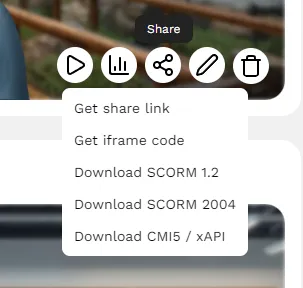
A zip file will be downloaded. This can be uploaded in your LMS when creating new content.
CMI5/xAPI
If your LMS supports the cmi5 standard, you can download a cmi5/xAPI package instead. It works the same way as SCORM: the learners’ progress, score, and pass/fail status are reported back to your LMS.
The steps are:
- Create a RolePlay if you haven’t already
- Go to your dashboard
- For the desired RolePlay, click the Share button and select “Download CMI5 / xAPI”
A zip file will be downloaded. This can be uploaded in your LMS when creating new content.
Play links
If your system doesn’t support SCORM or cmi5/xAPI, you can simply add a link to the RolePlay, and track progress through our system.
- Create a RolePlay if you haven’t already
- Go to your dashboard
- For the desired RolePlay, click the Share button and select “Get share link”
iFrame
For more flexible embedding, use the iFrame code to embed the RolePlay within any supported iFrame area in your LMS.
The steps are:
- Create a RolePlay if you haven’t already.
- Go to your dashboard.
- For the desired RolePlay, click the Share button and select “Get iFrame code.”
- Adjust the
widthandheightattributes in the code if needed. - Paste the iFrame code into a supported iFrame area within your LMS.